
LTspice command: .op
Node voltage and Mesh current are methods that systematically calculate voltages and currents in a circuit. Although LTspice calculate voltages and currents by using sophisticated network theory, but nonetheless, it can be useful to match the node voltages and mesh currents with hand calculation as required to do so in a first year elementary circuit courses. Mesh current and Node voltage examples here are purely for academic purpose. The goal here is to introduce .op command. It perform a dc operating point analysis and calculate all the node voltages and branch currents in a given circuit.
Following simple circuit is used to illustrate the mesh current analysis by hand:
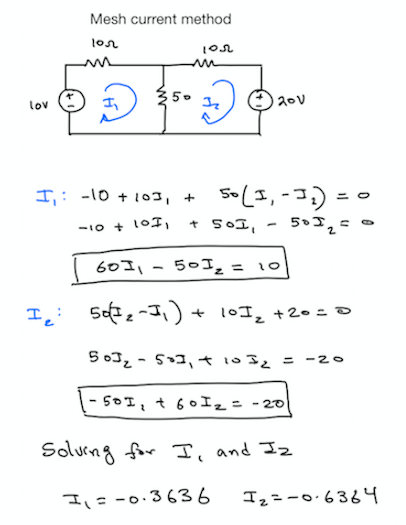
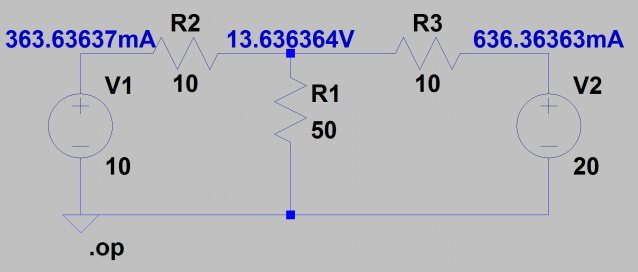
To get mesh currents from the Ltpsice .op analysis, one has to make sure to get the branch current that is isolated and matches with its mesh current counterpart. For example, current going through 10V source is same as mesh current I1 except polarity is reversed. This is because LTspice takes the current direction into the voltage source. Here is LTspice example for the above hand analysis.
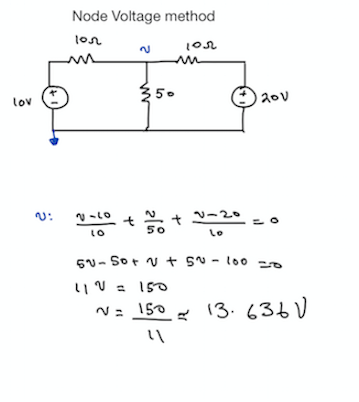
Here is the simple node voltage analysis of the same circuit. Reading the node voltage in LTspice is exactly the same as node voltage calculation by hand given reference node is the same in both cases.
To sum up, the point of this post was to illustrate .op spice statement and how it can calculate dc voltages and currents in a give circuit topology. As an example, Mesh current and Node voltage methods were used in a simple circuit.
If you want to discuss it further, please jump here:
https://www.eevblog.com/forum/projects/ltspice-for-ee-students/


 iExploreSiliconValley.com